DELL 0J57T0 Poweredge Server Pci Card Slot Riser Board Cage R720 3X X8 2U
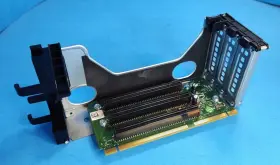
( Brand: Dell ), ( Manufacturer Part Number: 0J57T0 ), ( Part Type: Server Card Board ), ( Product Line: Poweredge )
Review DELL Poweredge Server 3x Pci express X8 Card Slot Riser Board 2u Cage
The Dell PowerEdge R720 Rack Server is a versatile and powerful solution designed to meet the demands of data-intensive workloads in various industries. One of the essential features of this server is its ability to accommodate expansion cards to increase functionality and performance. Dell offers a 3x PCI-Express x8 Card Slot Riser Board, model number 0J57T, as an optional addition for the PowerEdge R720. This riser board is particularly advantageous for all 2U (two unit) high expansion blade enclosures.
The riser board provides three PCI-Express x8 expansion slots, enabling the installation of various high-performance expansion cards such as network adapters, storage controllers, GPU accelerators, and many more. Installing these expansion cards can support additional functionality, enhance application processing power, and enable advanced data transfer speeds. The use of the 0J57T riser board results in a more organized and neat server design, since the installation of PCI-Expansion Cards directly on the motherboard can sometimes result in a cluttered interior.
The 0J57T PCI-Express x8 Card Slot Riser Board is carefully engineered to meet Dell's stringent standards and enhances the scalability and versatility of the R720 PowerEdge Server. The board features robust construction, ensuring reliable operation under various environmental conditions within the data center.
To install the riser board, simply follow these steps:1. First, ensure the PowerEdge R720 Server is shut down, and all power and fans are off.
2. Open the front bezel of the server and push the latch on the left side of the server's front bezel towards the back of the chassis to remove it.
3. From the back of the server, detach the fan cover and remove the two screws securing the riser rail.
4. Position the riser board into the empty slot and secure it using the included screws.
5. Connect the power and data cables from the riser board to the appropriate locations on the motherboard, and then securely attach the fan cover.
6. Install PCI Express expansion cards into the vacant riser slots.
7. Replace the server s front bezel, securing it with the latch on the left side and reconnect all the fans, power and data cables.
With this upgrade, the R720 PowerEdge Server becomes an even more powerful and flexible platform to run your most demanding applications.
Dell Poweredge R720 Server 3x PCI-Express x8 Card Slot Riser Board (0J57T): Weighing the Pros and Cons
The Dell Poweredge R720 server is a powerful and versatile data center solution, offering high performance, expandability, and reliability. One popular add-on for this server is the Dell 0J57T PCI-Express x8 Card Slot Riser Board, a 2U cage designed to accommodate up to three PCI-Express x8 graphics cards or other expansion cards. Establishing an informed decision regarding this investment necessitates a comprehensive examination of its pros and cons.
Pros:1. Enhanced Graphics Capability: The primary reason businesses opt for this riser board is to max out their graphics processing unit (GPU) capabilities in the Poweredge R720 server. By supporting three GPUs, organizations can scale their compute power for heavy applications like AI, video rendering, and data analysis.
2. Flexibility: The Dell 0J57T provides flexibility to the user by not restricting the types of PCI-Express cards it can accommodate, which is an advantage for organizations that require various expansion capabilities.
3. Compact Design: The 2U cage saves valuable space in data centers and minimizes the overall height of the server rack, ensuring efficient utilization of space.
4. Improved Cooling: The riser board has an assigned cooling system to maintain an optimal server temperature during intensive computations.
5. Scalability: United with the Dell Poweredge R720 server, the riser board facilitates future-proofing for businesses, making it an excellent scalability solution for growing demands.
Cons:1. Increased Cost: Adding the riser board and PCI-Express x8 cards can result in a substantial financial commitment, possibly impacting the total cost of ownership (TCO).
2. Power Consumption Increase: Intensive GPU usage on multiple cards can result in higher power draw, leading to additional electricity bills and environmental concerns.
3. Complexity: Introducing the riser board increases the complexity of server management and potentially may require additional expertise to handle installation and configuration.
4. Extra Cables: The addition of a riser board can mean extra cables connecting to the server, potentially making the cabling more intricate and difficult to manage.
Conclusion:Evaluating the Dell Poweredge R720 Server 3x PCI-Express x8 Card Slot Riser Board 0J57T involves keen consideration of both the advantages and disadvantages. Organizations with demanding workloads requiring GPU acceleration, compact server spaces, and a willingness to address increased costs can reap significant benefits from this investment. However, it is crucial to consider the potential trade-offs, such as higher expenses, power consumption, and management complexities.
Recommendation:For businesses seeking to accommodate multiple GPUs in a Dell Poweredge R720 server, the PCI-Express x8 Card Slot Riser Board 0J57T can be a worthwhile investment, especially when factoring in the enhanced graphics processing capabilities and space-saving design. If organizations can allocate resources for the additional costs, power supplies, and cooling necessities, this solution may contribute significantly to their overall infrastructure and performance goals. Alternatively, businesses with less demanding application requirements or limited budgets might consider alternative, less complex scaling solutions instead.
Details:
Dell PowerEdge R720 Server 3x PCI-Express x8 Card Slot Riser Board w/ 2U Cage.
part #: 0j57t0 prices
- $44.99-$265.85
specifications servertimber:
- brand: Dell
- mpn: 0j57t0
- part type: Server Card Board
- product line: Poweredge
shipping servertimber:
- transit: 4-8 Days
- cost: $0.00
- type: Calculated
- service: USPS Ground Advantage, USPS Priority Mail, USPS Priority Mail Express
- carrier: USPS
- class: Standard, Expedited
offer servertimber:
- sold: 0
- quantity: 1
- started: October 28, 2024
- availability: In Stock
- options: Ship-to-home
general servertimber:
- Enterprise Networking, Servers > Server Components > Server Boards
- condition: Used
returns servertimber:
- policy: Returns Accepted
- time: 30 Days
- paid by: Seller
- method: Money back
payments servertimber:
- other
- wallet: Paypal
- credit card: Discover
seller servertimber:
- city: Delmar,
- rating: 100.0%
- # reviews: 18127
Dell 0J57T0 Is Similar To:
- Dell 0tt740 Tt740 Poweredge 1950 Server Motherboard (52.6% similar) Links for further part information is below. The item also comes with reinforced motherboard bookplate, screws, CPU cooler mounts, and RJ11 toe. The board was tested and functions correctly. The item purchase also includes 2, intel xenon E5405 cups preinstalled. The item is used and...(May 23rd, 2024)
- Dell Pv5xf Idsdm And Combo Card Reader Dual Sd For 15gen (38% similar) Used works great...(May 23rd, 2024)
- Dell Ddn4n-rf Serial Port Add On Card For A Poweredge R650 (26.4% similar) Used works great...(May 23rd, 2024)
- Dell 0nh4p Poweredge R710 Motherboard 00nh4p Pulled (49.6% similar) Item condition refurbished means we pull the parts from working systems. Or its subsidiaries in the USA and other countries. Item condition new others means item pulled from brand new system and does not have original manufacturer packaging material.: Dell poweredge...(May 23rd, 2024)
- Dell R250 Poweredge 1u Server Motherboard 4 Dimm Dp n Mtyyt (51% similar) This unit does not come with any cables, accessories, disks, or instructional booklet's. Testing procedures. Computers: we load our refurbished systems with custom windows operating system software and all components are stress tested using utilities like prime 95, hard disk sentinel, more...(May 23rd, 2024)
- Dell R440 Poweredge R440 540 Server Motherboard 16 Dimm Dp n Wkgth With Heatsinks (50.3% similar) Dell poweredge R440/540 server motherboard 16 dim DP/n: kith w/heat sinks this unit is sold as it shown on the pictures. This unit has had its serial number covered for security. Consumer electronics: we perform a power and connectivity test as well preliminary inspection to...(May 23rd, 2024)
- Dell 4jn2k Poweredge R440 540 Server Motherboard 16 Dimm Dp n With Heatsinks (51.9% similar) Testing procedures. This unit has minor wear but been tested without issue to power on and boot. Network gear: our used / refurbished network equipment is port and power on tested. This unit was previously used and may show some signs of wear. After installation of the windows operating...(May 23rd, 2024)
- Dell Dk50w Poweredge R630 Server Motherboard Dp n Cncjw 2c2cp 86d43 (51% similar) Specifications brand: Dell. After installation of the windows operating system, each computer is performance tuned and startup optimized to ensure system integrity under high levels stress. Computers: we load our refurbished systems with custom windows operating system software and all...(May 23rd, 2024)
- Dell 1kpx8 Poweredge R740 R740xd System Motherboard (46.7% similar) If you would like clarification based on the pictures, please feel free to ask. This offer is for qty 1 x Dell poweredge R740 R740XD system motherboard p/n: 1KPX8. The pictures provided are taken in-house, however they may not be of the exact unit...(May 24th, 2024)
- Dell 020hj R720 Motherboard Server System Board 0020hj (44.3% similar) This listing is for a Dell 020HJ R720 motherboard server system board 0020HJ. Tested working. Pulled from a working system...(May 24th, 2024)
- Dell Xwp8p Poweredge T630 T430 16-port 2.5 Inch Backplane Board (43% similar) The board was pulled from a tested Dell poweredge T630 server. Dell poweredge T630 T430 16-PORT 2.5 back plane board XWP8P: on the image to up for sale is a 16-PORT back plane board, XWP8P. It is the Dell poweredge T630 back plane board only. The board is in good...(May 24th, 2024)