DELL 59K4P Front Poweredge Server Vga Usb Control Panel Cables R220 I/o
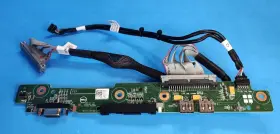
( Brand: Dell ), ( Manufacturer Part Number: 59K4P ), ( Connectors: Usb 2.0, Vga ), ( Form Factor: Board ), ( Type: Server ), ( Product Line: Poweredge )
Review DELL Poweredge Server Front Input I/o Vga Usb Control Panel Cables
The Dell 59K4P PowerEdge R220 Server Front VGA USB Control Panel Cables are an essential accessory for managing and monitoring your Dell PowerEdge R220 server efficiently. This set of cables includes a VGA cable and a USB cable, both designed specifically for the front control panel of the Dell PowerEdge R220 server.
The VGA cable (Dell Part Number: 59K4P) is a high-quality, flat ribbon cable that connects the server's motherboard to the VGA port on the front panel. This cable allows you to view the server's BIOS setup screen or any other display output directly from the server's front panel, eliminating the need for an external monitor during initial setup or troubleshooting.
The USB cable (Dell Part Number: 59K4Q) is a standard USB A to USB mini-B cable that connects the server's motherboard to the USB port on the front panel. This cable enables you to access the server's USB ports from the front panel, which can be particularly useful for tasks like installing server software, booting from a USB drive, or transferring files.
Both cables are designed to fit perfectly into their respective ports on the Dell PowerEdge R220 server's front panel, ensuring a secure connection and reducing the risk of damage. The cables are also made with high-quality materials to ensure durability and reliability, making them a long-lasting investment for your server.
In summary, the Dell 59K4P PowerEdge R220 Server Front VGA USB Control Panel Cables are an essential accessory for managing and monitoring your Dell PowerEdge R220 server. They provide an easy and convenient way to view the server's BIOS setup screen and access its USB ports from the front panel, making setup, troubleshooting, and server management more straightforward.
Pros of buying Dell PowerEdge R220 Server with Front VGA, USB Control Panel Cables:1. Reliability: Dell is a well-known brand with a reputation for producing reliable and high-quality servers. The PowerEdge R220 is no exception.
2. Compatibility: The server is compatible with a wide range of operating systems and applications, making it a versatile choice for many businesses.
3. Energy Efficiency: The PowerEdge R220 is designed to be energy efficient, which can help reduce your electricity bills over time.
4. Easy Management: The front VGA and USB control panel cables make it easy to manage the server without having to open its case, which can save time and reduce the risk of damage.
Cons of buying Dell PowerEdge R220 Server with Front VGA, USB Control Panel Cables:1. Cost: The server and its accessories can be quite expensive, which may be a prohibitive factor for some businesses with limited budgets.
2. Requires Technical Knowledge: While the server is easy to manage, it requires some technical knowledge to set up and maintain, which may be a challenge for some users.
3. Limited Expandability: The server may not be able to handle as many expansion cards or drives as more powerful servers, which may limit its scalability for some businesses.
Conclusion:The Dell PowerEdge R220 server with front VGA and USB control panel cables is a reliable, versatile, and energy-efficient option for businesses that need a powerful and easy-to-manage server. However, its cost and limited expandability may be a concern for some users. If you have the budget and technical skills to manage the server, it can be a great investment for your business.
Recommendation:If you are in the market for a server and have a budget of around $5,000, the Dell PowerEdge R220 with front VGA and USB control panel cables is a strong contender. However, it's always a good idea to shop around and compare prices and specifications from different vendors to ensure you are getting the best deal. Additionally, make sure to consider your business's specific needs and requirements before making a purchase decision.
Details:
Dell PowerEdge R220 Server Front Input I/O VGA USB Control Panel w/Cables 59K4P.
part #: 59k4p prices
- $17.00-$149.97
specifications servertimber:
- brand: Dell
- mpn: 59k4p
- connectors: Usb 2.0, Vga
- form factor: Board
- type: Server
- product line: Poweredge
general servertimber:
- Enterprise Networking, Servers > Server Components > Server Boards
- condition: Used
offer servertimber:
- started: October 14, 2024
- quantity: 1
- sold: 0
- options: Ship-to-home
- availability: In Stock
returns servertimber:
- paid by: Seller
- policy: Returns Accepted
- time: 30 Days
- method: Money back
shipping servertimber:
- type: Calculated
- class: Standard, Expedited
- transit: 4-7 Days
- service: USPS Ground Advantage, USPS Priority Mail, USPS Priority Mail Express
- cost: $0.00
- carrier: USPS
seller servertimber:
- rating: 100.0%
- city: Delmar,
- # reviews: 18108
payments servertimber:
- credit card: Visa
- wallet: Google-pay
- other
Dell 59K4P Is Similar To:
- Dell 0tt740 Tt740 Poweredge 1950 Server Motherboard (45.1% similar) Links for further part information is below. The item also comes with reinforced motherboard bookplate, screws, CPU cooler mounts, and RJ11 toe. The board was tested and functions correctly. The item purchase also includes 2, intel xenon E5405 cups preinstalled. The item is used and...(May 23rd, 2024)
- Dell Ddn4n-rf Serial Port Add On Card For A Poweredge R650 (27.1% similar) Used works great...(May 23rd, 2024)
- Dell 0nh4p Poweredge R710 Motherboard 00nh4p Pulled (40.6% similar) Item condition refurbished means we pull the parts from working systems. Or its subsidiaries in the USA and other countries. Item condition new others means item pulled from brand new system and does not have original manufacturer packaging material.: Dell poweredge...(May 23rd, 2024)
- Dell R250 Poweredge 1u Server Motherboard 4 Dimm Dp n Mtyyt (41.1% similar) This unit does not come with any cables, accessories, disks, or instructional booklet's. Testing procedures. Computers: we load our refurbished systems with custom windows operating system software and all components are stress tested using utilities like prime 95, hard disk sentinel, more...(May 23rd, 2024)
- Dell R440 Poweredge R440 540 Server Motherboard 16 Dimm Dp n Wkgth With Heatsinks (46.6% similar) Dell poweredge R440/540 server motherboard 16 dim DP/n: kith w/heat sinks this unit is sold as it shown on the pictures. This unit has had its serial number covered for security. Consumer electronics: we perform a power and connectivity test as well preliminary inspection to...(May 23rd, 2024)
- Dell 4jn2k Poweredge R440 540 Server Motherboard 16 Dimm Dp n With Heatsinks (48.1% similar) Testing procedures. This unit has minor wear but been tested without issue to power on and boot. Network gear: our used / refurbished network equipment is port and power on tested. This unit was previously used and may show some signs of wear. After installation of the windows operating...(May 23rd, 2024)
- Dell Dk50w Poweredge R630 Server Motherboard Dp n Cncjw 2c2cp 86d43 (43% similar) Specifications brand: Dell. After installation of the windows operating system, each computer is performance tuned and startup optimized to ensure system integrity under high levels stress. Computers: we load our refurbished systems with custom windows operating system software and all...(May 23rd, 2024)
- Dell 1kpx8 Poweredge R740 R740xd System Motherboard (43.6% similar) If you would like clarification based on the pictures, please feel free to ask. This offer is for qty 1 x Dell poweredge R740 R740XD system motherboard p/n: 1KPX8. The pictures provided are taken in-house, however they may not be of the exact unit...(May 24th, 2024)
- Dell 020hj R720 Motherboard Server System Board 0020hj (29.4% similar) This listing is for a Dell 020HJ R720 motherboard server system board 0020HJ. Tested working. Pulled from a working system...(May 24th, 2024)
- Dell Xwp8p Poweredge T630 T430 16-port 2.5 Inch Backplane Board (45.5% similar) The board was pulled from a tested Dell poweredge T630 server. Dell poweredge T630 T430 16-PORT 2.5 back plane board XWP8P: on the image to up for sale is a 16-PORT back plane board, XWP8P. It is the Dell poweredge T630 back plane board only. The board is in good...(May 24th, 2024)
- Dell 766548-1 Poweredge 2600 Server 09k350 Power 9k350 Amp Cable 5m130 (50% similar) Dell poweredge 2600 server 09K350 power 9K350 cable 766548-1 5M130, bin CP1...(May 25th, 2024)