DELL JJ556 Poweredge Kvm Usb Dongle 638745468849 1855/1955 Kvm/usb
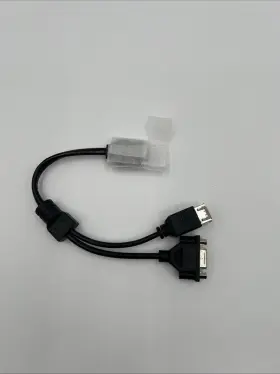
( Brand: Dell ), ( Manufacturer Part Number: JJ556 ), ( Custom Bundle: No ), ( Compatible Model: Dell Poweredge 1855/19 ), ( Form Factor: Atx ), ( Type: Dongle ), ( Ports: 1x Vga Ports 2x Usb Ports ), ( Compatible Line: Dell Poweredge ), ( UPC: 638745468849 )
Review DELL Poweredge 1855/1955 Kvm/usb Dongle
The Dell JJ556 KVM/USB Dongle is a versatile and practical solution for managing multiple servers or workstations efficiently. This compact device allows you to connect and control up to four systems using a single keyboard, video display, and mouse (KVM). It is compatible with Dell PowerEdge 1855 and 1955 servers.
The KVM switch function enables you to seamlessly toggle between connected systems without the need for multiple keyboards, monitors, and mice. With this dongle, you can save desk space and reduce clutter. Additionally, it offers hotkey support, allowing you to quickly switch between servers with a simple key press.
The USB function of the Dell JJ556 KVM/USB Dongle is equally useful. It features four USB 2.0 ports that allow you to connect peripherals such as printers, scanners, or external hard drives to each of the connected servers. This feature makes it easier to share resources between servers and eliminates the need for multiple USB cables.
The Dell KVM/USB Dongle is designed with a robust and reliable build. It features a metal housing that protects it from damage and ensures durability. The cable lengths of the KVM and USB cables are suitable for most server rack configurations, making installation a breeze. The dongle is also energy efficient, consuming minimal power when not in use.
In summary, the Dell JJ556 KVM/USB Dongle is an essential tool for IT professionals who manage multiple servers or workstations. Its KVM functionality saves desk space and reduces clutter, while its USB ports enable the sharing of peripherals between connected systems. With a robust build and energy efficiency, this dongle is a reliable and practical solution for managing multiple systems with ease.
The Dell JJ556 PowerEdge 1855/1955 KVM/USB Dongle is a device designed to provide console access and USB redirection for managing Dell PowerEdge servers. Here are some pros and cons that can help you decide if this device is a good fit for your needs.
Pros:1. Centralized Management: The KVM switch feature allows you to manage multiple servers using a single keyboard, video, and mouse setup, making it more convenient and efficient.
2. USB Redirection: The USB dongle enables you to use USB devices connected to the server as if they were connected to your local computer, which is useful for tasks like installing software or transferring files.
3. Remote Management: The device supports remote management through the Dell OpenManage Essentials or Dell OpenManage Server Administrator software, allowing you to manage your servers from anywhere.
4. Compatibility: The JJ556 dongle is compatible with a wide range of Dell PowerEdge servers, including the 1855 and 1955 models.
Cons:1. Cost: The Dell JJ556 PowerEdge 1855/1955 KVM/USB Dongle is a premium solution and may be more expensive than other KVM switches or USB redirection solutions.
2. Limited Ports: Depending on the specific model, the KVM switch may only support a limited number of servers, which could be a concern if you need to manage a large number of servers.
3. Dependence on Software: To fully utilize the features of the KVM switch and USB redirection, you'll need to install the Dell OpenManage software, which may require additional time and resources.
Conclusion:The Dell JJ556 PowerEdge 1855/1955 KVM/USB Dongle is a powerful and convenient solution for managing Dell PowerEdge servers. Its centralized management features, USB redirection capabilities, and remote management support make it an attractive option for IT professionals and data center administrators. However, its cost and potential limitations in terms of the number of servers it can manage may be a concern for some users. Ultimately, the decision to purchase the JJ556 dongle depends on your specific needs and budget. If you manage a small number of Dell PowerEdge servers and require advanced features like USB redirection and remote management, the JJ556 dongle could be a worthwhile investment. If you have a larger number of servers or are on a tight budget, you may want to consider alternative solutions.
Details:
Shipped with USPS Ground Advantage. Dell POWEREDGE 1855/1955 KVM/USB Dongle JJ556.
part #: jj556 prices
- $35.00-$64.99
specifications servertimber:
- brand: Dell
- mpn: Jj556
- custom bundle: No
- compatible model: Dell Poweredge 1855/19
- form factor: Atx
- type: Dongle
- ports: 1x Vga Ports 2x Usb Ports
- compatible line: Dell Poweredge
- upc: 638745468849
general servertimber:
- condition: Open box
- Enterprise Networking, Servers > Server Components > Server Boards
shipping servertimber:
- carrier: USPS
- cost: $0.00
- transit: 5-11 Days
- type: Calculated
- class: Standard
- service: USPS Ground Advantage
returns servertimber:
- policy: No Returns
payments servertimber:
- credit card: Diners-club
- other
- wallet: Google-pay
seller servertimber:
- city: Austin, Texas
- # reviews: 2129
- rating: 99.7%
offer servertimber:
- options: Ship-to-home
- quantity: 1
- sold: 0
- started: December 12, 2025
- availability: In Stock
Dell JJ556 Is Similar To:
- Dell 0tt740 Tt740 Poweredge 1950 Server Motherboard (43.8% similar) Links for further part information is below. The item also comes with reinforced motherboard bookplate, screws, CPU cooler mounts, and RJ11 toe. The board was tested and functions correctly. The item purchase also includes 2, intel xenon E5405 cups preinstalled. The item is used and...(May 23rd, 2024)
- Dell Ddn4n-rf Serial Port Add On Card For A Poweredge R650 (33% similar) Used works great...(May 23rd, 2024)
- Dell 0nh4p Poweredge R710 Motherboard 00nh4p Pulled (45.8% similar) Item condition refurbished means we pull the parts from working systems. Or its subsidiaries in the USA and other countries. Item condition new others means item pulled from brand new system and does not have original manufacturer packaging material.: Dell poweredge...(May 23rd, 2024)
- Dell R250 Poweredge 1u Server Motherboard 4 Dimm Dp n Mtyyt (44.2% similar) This unit does not come with any cables, accessories, disks, or instructional booklet's. Testing procedures. Computers: we load our refurbished systems with custom windows operating system software and all components are stress tested using utilities like prime 95, hard disk sentinel, more...(May 23rd, 2024)
- Dell R440 Poweredge R440 540 Server Motherboard 16 Dimm Dp n Wkgth With Heatsinks (41.3% similar) Dell poweredge R440/540 server motherboard 16 dim DP/n: kith w/heat sinks this unit is sold as it shown on the pictures. This unit has had its serial number covered for security. Consumer electronics: we perform a power and connectivity test as well preliminary inspection to...(May 23rd, 2024)
- Dell 4jn2k Poweredge R440 540 Server Motherboard 16 Dimm Dp n With Heatsinks (43% similar) Testing procedures. This unit has minor wear but been tested without issue to power on and boot. Network gear: our used / refurbished network equipment is port and power on tested. This unit was previously used and may show some signs of wear. After installation of the windows operating...(May 23rd, 2024)
- Dell Dk50w Poweredge R630 Server Motherboard Dp n Cncjw 2c2cp 86d43 (41.1% similar) Specifications brand: Dell. After installation of the windows operating system, each computer is performance tuned and startup optimized to ensure system integrity under high levels stress. Computers: we load our refurbished systems with custom windows operating system software and all...(May 23rd, 2024)
- Dell 1kpx8 Poweredge R740 R740xd System Motherboard (39.6% similar) If you would like clarification based on the pictures, please feel free to ask. This offer is for qty 1 x Dell poweredge R740 R740XD system motherboard p/n: 1KPX8. The pictures provided are taken in-house, however they may not be of the exact unit...(May 24th, 2024)
- Dell Xwp8p Poweredge T630 T430 16-port 2.5 Inch Backplane Board (40.7% similar) The board was pulled from a tested Dell poweredge T630 server. Dell poweredge T630 T430 16-PORT 2.5 back plane board XWP8P: on the image to up for sale is a 16-PORT back plane board, XWP8P. It is the Dell poweredge T630 back plane board only. The board is in good...(May 24th, 2024)
- Dell 766548-1 Poweredge 2600 Server 09k350 Power 9k350 Amp Cable 5m130 (40% similar) Dell poweredge 2600 server 09K350 power 9K350 cable 766548-1 5M130, bin CP1...(May 25th, 2024)
- Dell H47hh Poweredge R620 System Board 0h47hh (42.2% similar) System board. Item condition refurbished means we pull the parts from working systems. Technology trader is an independent distribution channel and not associated with hp, Dell, AMD, Cisco, Emile's, intel, Hitachi, IBM, logic, Samsung, sea gate, sun, western digital all other...(May 25th, 2024)