DELL Hdd Backplane Poweredge 0XP569 8X 3.5 R520
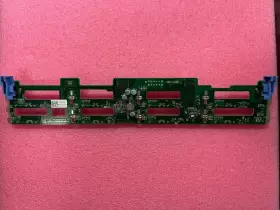
( Brand: Dell ), ( Manufacturer Part Number: XP569 ), ( Type: Hdd Backplane Board ), ( Network Ports: Sas ), ( Product Line: Poweredge )
Review DELL 8x 3.5 Inch Hdd Backplane For Poweredge
The Dell XP569 0XP569 8x HDD Backplane for PowerEdge R520 is a high-performance expansion solution designed to enhance the storage capabilities of your Dell PowerEdge R520 server. This backplane is specifically engineered to accommodate up to eight 2.5-inch or 3.5-inch hard disk drives, providing ample room for data storage expansion.
The XP569 backplane is constructed with robust materials, ensuring durability and reliability in demanding data center environments. It features a hot-plug design, allowing you to add or remove drives without powering down the server, minimizing downtime and maximizing productivity.
The backplane is equipped with a built-in power distribution unit (PDU), which delivers power to each drive. This ensures that each drive receives the necessary power, ensuring optimal performance and reducing the risk of power-related failures. The PDU also features intelligent power management, which automatically adjusts power distribution based on the number and type of drives installed.
The XP569 backplane is compatible with a wide range of hard disk drive models, providing flexibility in choosing the drive that best fits your storage needs. It also supports various RAID configurations, allowing you to optimize data protection and availability.
The installation of the XP569 backplane is straightforward and can be done without the need for specialized tools or technical expertise. The backplane is easily slid into the server chassis and secured in place, and the drives are installed using standard drive trays.
In summary, the Dell XP569 0XP569 8x HDD Backplane for PowerEdge R520 is a reliable and flexible expansion solution for your Dell PowerEdge R520 server. Its robust construction, hot-plug design, and built-in PDU make it an ideal choice for data center applications, while its compatibility with various drive models and RAID configurations provide flexibility in meeting your storage needs.
Pros of buying Dell PowerEdge R520 with 8x HDD Backplane (Model: XP569-0XP569):1. Scalability: The R520 server supports up to 8 hard drives, which can be easily added or upgraded with the XP569 backplane. This makes it an excellent choice for businesses that require high storage capacity and have growth expectations.
2. Reliability: Dell is a well-known brand with a reputation for producing high-quality, reliable products. The PowerEdge R520 is a testament to this, with its robust design and components.
3. Flexibility: The server supports a variety of operating systems, including Windows Server, Red Hat Enterprise Linux, and Ubuntu. This gives users the flexibility to choose the OS that best fits their needs.
4. Energy Efficiency: The R520 is designed to be energy-efficient, with features like power-saving modes and hot-plug power supplies. This can help reduce operating costs in the long run.
5. Compatibility: The server is compatible with a wide range of hardware and software, making it easy to integrate into existing IT infrastructure.
Cons of buying Dell PowerEdge R520 with 8x HDD Backplane (Model: XP569-0XP569):1. Initial Cost: The server and the XP569 backplane can be quite expensive, especially when compared to lower-end servers. This might make it a less attractive option for small businesses with limited budgets.
2. Size and Weight: The R520 is a large and heavy server, which can make it difficult to transport or install in smaller spaces.
3. Upgrade Limitations: While the server supports up to 8 hard drives, the XP569 backplane does not support SSDs. This could limit the server's performance if SSDs are required.
4. Power Consumption: While the R520 is energy-efficient, it does consume a significant amount of power, especially when under heavy load. This could lead to high electricity bills.
Conclusion: The Dell PowerEdge R520 with 8x HDD Backplane (Model: XP569-0XP569) is a powerful, reliable, and flexible server that is well-suited for businesses with high storage needs and growth expectations. However, its high initial cost and power consumption could be a disadvantage for some users. If SSD support is a priority, users might want to consider alternatives that support SSDs.
Recommendation: If the R520's features and capabilities align with your business needs, and you can afford the initial investment, it could be a great choice. However, it's always a good idea to thoroughly evaluate your requirements and compare the R520 with other servers in its class before making a decision.
Details:
part #: xp569 prices
- $15.25-$19.99
specifications servertimber:
- brand: Dell
- mpn: Xp569
- type: Hdd Backplane Board
- network ports: Sas
- product line: Poweredge
offer servertimber:
- quantity: 1
- options: Ship-to-home
- best offers: True
- availability: In Stock
- started: May 28, 2024
- sold: 0
seller servertimber:
- city: Santa Clara, California
- # reviews: 11747
- rating: 98.8%
general servertimber:
- Enterprise Networking, Servers > Server Components > Server Boards
- condition: Used
shipping servertimber:
- type: Fixed
- transit: 3-8 Days
- cost: $9.95
- service: Standard
- class: Standard
payments servertimber:
- wallet: Google-pay
- credit card: Discover
returns servertimber:
- time: 14 Days
- method: Money back
- policy: Returns Accepted
- paid by: Buyer
Dell XP569 Is Similar To:
- Dell 0tt740 Tt740 Poweredge 1950 Server Motherboard (35.4% similar) Links for further part information is below. The item also comes with reinforced motherboard backplane, screws, CPU cooler mounts, and RJ11 toe. The board was tested and functions correctly. The item purchase also includes 2, intel xenon E5405 cups preinstalled. The item is used and...(May 23rd, 2024)
- Dell Pv5xf Idsdm And Combo Card Reader Dual Sd For 15gen (35.6% similar) Used works great...(May 23rd, 2024)
- Dell Ddn4n-rf Serial Port Add On Card For A Poweredge R650 (48.3% similar) Used works great...(May 23rd, 2024)
- Dell 0nh4p Poweredge R710 Motherboard 00nh4p Pulled (38.9% similar) Item condition refurbished means we pull the parts from working systems. Or its subsidiaries in the USA and other countries. Item condition new others means item pulled from brand new system and does not have original manufacturer packaging material.: Dell poweredge...(May 23rd, 2024)
- Dell R250 Poweredge 1u Server Motherboard 4 Dimm Dp n Mtyyt (29.8% similar) This unit does not come with any cables, accessories, disks, or instructional booklet's. Testing procedures. Computers: we load our refurbished systems with custom windows operating system software and all components are stress tested using utilities like prime 95, hard disk sentinel, more...(May 23rd, 2024)
- Dell R440 Poweredge R440 540 Server Motherboard 16 Dimm Dp n Wkgth With Heatsinks (26.6% similar) Dell poweredge R440/540 server motherboard 16 dim DP/n: kith w/heat sinks this unit is sold as it shown on the pictures. This unit has had its serial number covered for security. Consumer electronics: we perform a power and connectivity test as well preliminary inspection to...(May 23rd, 2024)
- Dell 4jn2k Poweredge R440 540 Server Motherboard 16 Dimm Dp n With Heatsinks (29% similar) Testing procedures. This unit has minor wear but been tested without issue to power on and boot. Network gear: our used / refurbished network equipment is port and power on tested. This unit was previously used and may show some signs of wear. After installation of the windows operating...(May 23rd, 2024)
- Dell Dk50w Poweredge R630 Server Motherboard Dp n Cncjw 2c2cp 86d43 (29.5% similar) Specifications brand: Dell. After installation of the windows operating system, each computer is performance tuned and startup optimized to ensure system integrity under high levels stress. Computers: we load our refurbished systems with custom windows operating system software and all...(May 23rd, 2024)
- Dell 1kpx8 Poweredge R740 R740xd System Motherboard (35.4% similar) If you would like clarification based on the pictures, please feel free to ask. This offer is for qty 1 x Dell poweredge R740 R740XD system motherboard p/n: 1KPX8. The pictures provided are taken in-house, however they may not be of the exact unit...(May 24th, 2024)
- Dell Xwp8p Poweredge T630 T430 16-port 2.5 Inch Backplane Board (33.6% similar) The board was pulled from a tested Dell poweredge T630 server. Dell poweredge T630 T430 16-PORT 2.5 backplane board XWP8P: on the image to up for sale is a 16-PORT backplane board, XWP8P. It is the Dell poweredge T630 backplane board only. The board is in good...(May 24th, 2024)
- Dell Tv5x6 Power Supply Backplane For Precision 78 (51.8% similar) Or its subsidiaries in the USA and other countries. Buyer pays shipping and handling. Item information. Pictures are for display purposes only, please see complete...(May 24th, 2024)