DELL YMXG9 Board Poweredge Dual Cpu Memory Slots Socket R710/
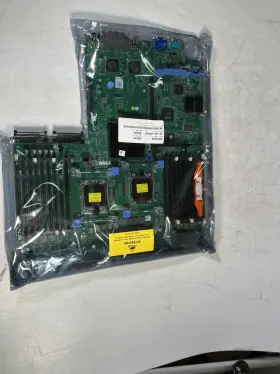
( Brand: Dell ), ( Manufacturer Part Number: YMXG9 ), ( Model: R710 2.5 3.5 ), ( Part Type: Memory Board System ), ( Compatible Brand: Dell Poweredge R710 ), ( Socket Type: Lga 1366/socket B ), ( Number Of Memory Slots: 18 ), ( L3 Cache: 8mb To 12mb ), ( Network Ports: 4 Integrated 10/100/1000 Ethernet Ports. ), ( Memory Type: Ddr3 Ecc Reg Sdram ), ( Modified Item: No ), ( Connectors: 1 Serial Port Expansion Slots, 2 Pcie X4, Or 1 Pcie X ), ( Form Factor: 2u Rack-mount Form Factor ), ( Unit Type: Unit ), ( Number Of Ports: 4 Integrated 10/100/1000 Ethernet Ports 2 Usb Ports 1 Vga Port ), ( Country/region Of Manufacture: China ), ( Bus Speed: 1333 Mhz ), ( Product Line: Dell Poweredge R710 Product Line )
Review DELL System Board For Poweredge R710/ Dual Cpu Sockets And Memory Slots
The Dell YMXG9 server motherboard is a high-performance solution designed specifically for Dell PowerEdge R710 servers with dual CPU sockets. This motherboard is engineered to deliver unrestricted compatibility with the latest Intel Xeon processors, enabling customers to maximize their server performance and capabilities.
The YMXG9 motherboard is engineered with 18 memory slots that support up to triple-channel DDR3 memory, allowing for a total memory capacity of up to 576GB. Moreover, it provides two 8-lane PCIe Gen3 slots and four 4-lane PCIe Gen3 slots, offering the flexibility to accommodate various expansion cards, such as network adapters, storage controllers, and graphics processors.
Key features of the Dell YMXG9 server motherboard include support for Intel QuickPath Technology (QPI), providing a high-bandwidth, low-latency interconnect between the CPU and other components. Additionally, the board integrates Intel I350 Ethernet controllers, delivering reliable and efficient networking capabilities.
The YMXG9 motherboard is also engineered for enterprise-grade manageability, featuring integrated PowerEdge Management Processor II (MP2) with remote management capabilities, including iDRAC7 Enterprise, allowing for efficient server monitoring, configuration, and updates even from a remote location.
Moreover, the board offers robust and flexible capabilities for different power configurations and power savings, like PowerEdge Power Optimizer and Dynamic Power Capping, reducing power consumption while promoting optimal performance and efficiency.
The Dell YMXG9 server motherboard incorporates advanced security features, including Trusted Platform Module (TPM), ensuring data security and protection against unauthorized access. Additionally, it supports various Redundant Array of Independent Disks (RAID) controllers, ensuring data availability and reducing downtime in mission-critical applications.
In conclusion, the Dell YMXG9 server motherboard is an advanced, reliable, and high-performing solution tailored for Dell PowerEdge R710 servers with dual CPU sockets. It offers extensive memory capacity, PCIe support, manageability features, power savings capabilities, and advanced security features, making it an ideal option for various enterprise applications.
The Dell YMXG9 server board is designed for use in Dell PowerEdge R710 servers, supporting dual CPU sockets and up to 18 memory slots. Here are some pros and cons of buying this server board:
Pros:1. Compatibility: The Dell YMXG9 is specifically designed for the PowerEdge R710, ensuring a seamless integration and fit.
2. Improved Performance: This server board supports the latest Intel Xeon processors, allowing users to take advantage of their increased processing power and improved efficiency.
3. Enhanced Memory Capacity: With support for up to 18 DDR3 memory slots, this board can handle large memory installations, making it suitable for data-intensive workloads.
4. Robust Features: The Dell YMXG9 offers built-in management features, including iDRAC8 with Lifecycle Controller, which enables you to manage and monitor your server remotely.
5. Scalability: The PowerEdge R710 and its compatible boards, including the YMXG9, offer a high level of scalability, allowing you to add more CPUs, memory, or other components as your needs grow.
Cons:1. Cost: The Dell YMXG9 and the PowerEdge R710 are enterprise-grade solutions, and the cost can be significant compared to consumer-grade hardware.
2. Complexity: Servers and their associated components can be complex to install, configure, and manage. A less experienced IT team may require assistance from a third-party consultant or external support.
3. Compatibility Limitation: The Dell YMXG9 is designed specifically for the PowerEdge R710, making it less versatile than a more universal motherboard. This may limit its usefulness in other systems.
In conclusion, the Dell YMXG9 server board is a powerful and feature-rich option for organizations requiring enterprise-level hardware to support data-intensive workloads. Its improved performance, enhanced memory capacity, and robust features make it an excellent choice for businesses looking to maximize their IT infrastructure's potential. However, its cost, complexity, and compatibility limitations may make it less appealing for smaller organizations or those with more modest requirements.
Recommendation:If your business requires a server with dual CPU sockets and a high memory capacity to support data-intensive workloads, the Dell PowerEdge R710 and its YMXG9 board could be an excellent investment. This solution offers improved performance, manageability, and scalability, which can help boost productivity and efficiency. However, carefully consider the cost and compatibility limitations before making a decision. Alternative options, such as newer dual-socket server models, should also be explored to ensure that you're getting the best solution for your specific use case.
Details:
Those are to be paid by the recipient/buyer. Device Not Powering On?: Check the power source and make sure correct charger or adapter is connected. Technical Support FAQs, Getting Started: No password needed. Try a different cable or outlet if the device still isn't responding.
Dell YMXG9 System Board for PowerEdge R710/ Dual CPU Sockets 18 Memory Slots, OPEN BOX. Charging Issues?: Ensure the correct charger is used for your specific model. Connectivity Issues Bluetooth/WI-Fi ?: Ensure the device is in pairing mode and Bluetooth/WI-Fi enabled on your phone or computer. CPU Sockets: 2.
Each hard drive undergoes thorough testing and is wiped using EPS Erase Data Erasure. Network Ports: 4 integrated 10/100/1000 Ethernet ports. If you're having trouble, restart both devices and try pairing again. Software Update Needed?: Some devices may require firmware or software updates for optimal performance.
Simply press Enter on the login screen. No accessories or charger are included in this listing.
part #: ymxg9 prices
- $43.95-$75.00
specifications servertimber:
- brand: Dell
- mpn: Ymxg9
- model: R710 2.5 3.5
- part type: Memory Board System
- compatible brand: Dell Poweredge R710
- socket type: Lga 1366/socket B
- number of memory slots: 18
- l3 cache: 8mb To 12mb
- network ports: 4 Integrated 10/100/1000 Ethernet Ports.
- memory type: Ddr3 Ecc Reg Sdram
- modified item: No
- connectors: 1 Serial Port Expansion Slots, 2 Pcie X4, Or 1 Pcie X
- form factor: 2u Rack-mount Form Factor
- unit type: Unit
- number of ports: 4 Integrated 10/100/1000 Ethernet Ports 2 Usb Ports 1 Vga Port
- country/region of manufacture: China
- bus speed: 1333 Mhz
- product line: Dell Poweredge R710 Product Line
seller servertimber:
- # reviews: 2489
- city: Euless, Texas
- rating: 98.1%
shipping servertimber:
- type: Fixed
- cost: $30.00
- class: Standard
- service: Standard
- transit: 3-8 Days
general servertimber:
- condition: Open box
- Enterprise Networking, Servers > Server Components > Server Boards
payments servertimber:
- credit card: Mastercard
- other
- wallet: Paypal
returns servertimber:
- paid by: Buyer
- method: Money back
- policy: Returns Accepted
- time: 30 Days
offer servertimber:
- options: Ship-to-home
- sold: 0
- availability: In Stock
- started: January 27, 2025
- quantity: 6
- best offers: True
Dell YMXG9 Is Similar To:
- Dell 0tt740 Tt740 Poweredge 1950 Server Motherboard (41.2% similar) Links for further part information is below. The item also comes with reinforced motherboard bookplate, screws, cpu cooler mounts, and RJ11 toe. The board was tested and functions correctly. The item purchase also includes 2, intel xenon E5405 cups preinstalled. The item is used and...(May 23rd, 2024)
- Dell Pv5xf Idsdm And Combo Card Reader Dual Sd For 15gen (42.6% similar) Used works great...(May 23rd, 2024)
- Dell Ddn4n-rf Serial Port Add On Card For A Poweredge R650 (43.5% similar) Used works great...(May 23rd, 2024)
- Dell 0nh4p Poweredge R710 Motherboard 00nh4p Pulled (36.6% similar) Item condition refurbished means we pull the parts from working systems. Or its subsidiaries in the USA and other countries. Item condition new others means item pulled from brand new system and does not have original manufacturer packaging material.: Dell poweredge...(May 23rd, 2024)
- Dell R250 Poweredge 1u Server Motherboard 4 Dimm Dp n Mtyyt (36% similar) This unit does not come with any cables, accessories, disks, or instructional booklet's. Testing procedures. Computers: we load our refurbished systems with custom windows operating system software and all components are stress tested using utilities like prime 95, hard disk sentinel, more...(May 23rd, 2024)
- Dell R440 Poweredge R440 540 Server Motherboard 16 Dimm Dp n Wkgth With Heatsinks (38.5% similar) Dell poweredge R440/540 server motherboard 16 dim DP/n: kith w/heat sinks this unit is sold as it shown on the pictures. This unit has had its serial number covered for security. Consumer electronics: we perform a power and connectivity test as well preliminary inspection to...(May 23rd, 2024)
- Dell 4jn2k Poweredge R440 540 Server Motherboard 16 Dimm Dp n With Heatsinks (39.7% similar) Testing procedures. This unit has minor wear but been tested without issue to power on and boot. Network gear: our used / refurbished network equipment is port and power on tested. This unit was previously used and may show some signs of wear. After installation of the windows operating...(May 23rd, 2024)
- Dell Dk50w Poweredge R630 Server Motherboard Dp n Cncjw 2c2cp 86d43 (34% similar) Specifications brand: Dell. After installation of the windows operating system, each computer is performance tuned and startup optimized to ensure system integrity under high levels stress. Computers: we load our refurbished systems with custom windows operating system software and all...(May 23rd, 2024)
- Dell 975f3 Motherboard No Cpu (34.9% similar) This item passed all key functionality tests. This motherboard is used. Please see the item photos. It is in good condition, inspected, and found free of defects.: Dell motherboard 975F3 no cpu. It passed post and was tested categorized as c6 used excellent, f3 key...(May 23rd, 2024)
- Dell 1kpx8 Poweredge R740 R740xd System Motherboard (42.7% similar) If you would like clarification based on the pictures, please feel free to ask. This offer is for qty 1 x Dell poweredge R740 R740XD system motherboard p/n: 1KPX8. The pictures provided are taken in-house, however they may not be of the exact unit...(May 24th, 2024)
- Dell 020hj R720 Motherboard Server System Board 0020hj (29.9% similar) This listing is for a Dell 020HJ R720 motherboard server system board 0020HJ. Tested working. Pulled from a working system...(May 24th, 2024)